7 Tips Can a Good Dental Unit Improve Workflow?

Time:2026-10-21 Author:Aria
0%

Can a good dental unit improve workflow? The evidence suggests it can, but equipment alone will not repair a poorly designed process. A reliable unit can place instruments, suction, lighting, and controls within safer reach. That small change may reduce repeated twisting, unnecessary movement, and treatment interruptions.

The World Health Organization’s Global Oral Health Status Report (2022) estimates that oral diseases affect nearly 3.5 billion people worldwide. Growing demand places more pressure on dental teams. Meanwhile, the American Dental Association Health Policy Institute has continued to identify staffing shortages, operating costs, and productivity as major practice concerns. These pressures make every chairside movement more important. The Centers for Disease Control and Prevention also stresses safe instrument handling, effective infection control, and clear clinical procedures. A dental unit should support all three.

Dental practice management expert Roger P. Levin, DDS, MBA, has often emphasized, “You cannot improve what you do not measure.” His point applies directly here. Before replacing a unit, a practice should track setup time, operatory turnover, instrument retrieval, and delays between procedures. The result may be surprising. The chair might be modern, yet the workflow may remain slow because supplies are poorly positioned.

This article examines seven practical ways a well-planned dental unit can improve workflow. It considers ergonomics, accessibility, infection-control design, team communication, and patient comfort. The goal is not faster dentistry at any cost. It is steadier care, fewer wasted steps, and a workspace that helps clinicians think clearly. Improvements may be imperfect at first. That is acceptable. Measure, adjust, and test again.
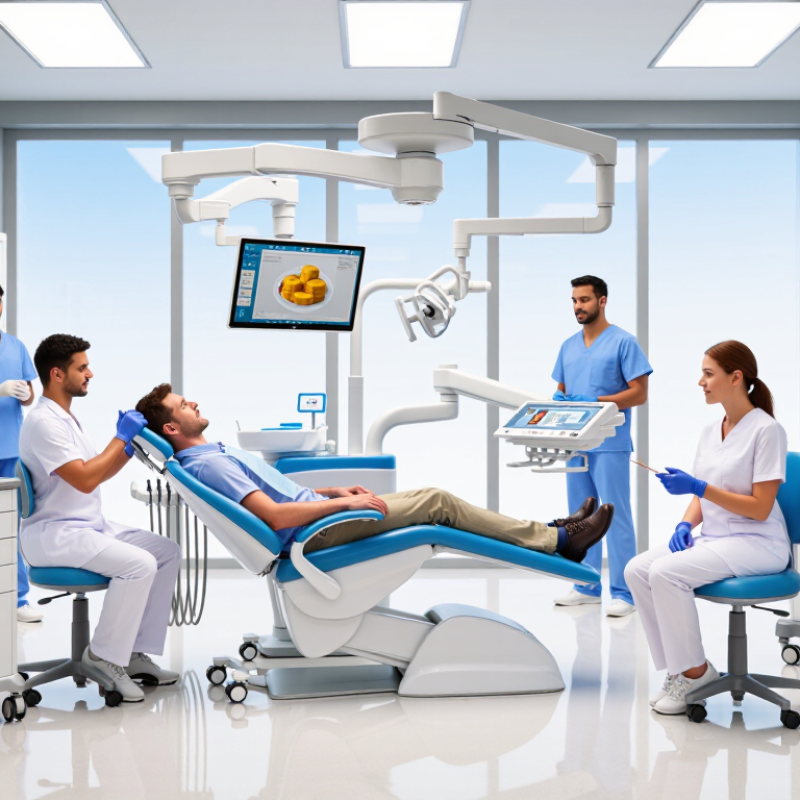
7 Tips Can a Good Dental Unit Improve Workflow?

How Dental Units Shape Efficiency in Clinical Workflows

7 Tips: Can a Good Dental Unit Improve Workflow?

A dental unit shapes efficiency through small, repeated actions. In busy clinics, I have seen staff lose minutes reaching for handpieces, controls, and suction lines.

Tip 1: Choose an adjustable unit that keeps essential instruments within easy reach.

Tip 2: Use foot controls for routine adjustments when possible. This reduces unnecessary hand movement.

Tip 3: Check whether the chair supports smooth patient positioning without repeated corrections. Small delays become noticeable by afternoon.

Tip 4: Prioritize clear surfaces and organized tubing. A cluttered work area slows treatment and increases awkward movements.

Tip 5: Select lighting that follows the treatment field without creating glare. Dentists need consistent visibility during detailed procedures.

Tip 6: Make cleaning points easy to access. Staff should not need to move heavy components before wiping high-touch areas. Infection-control routines still require trained judgment and approved protocols.

Tip 7: Test the unit with the entire team before regular use. A feature may look useful but feel inconvenient during real treatment. Ask assistants where delays occur. Record setup times for several appointments. The data may challenge assumptions. Good workflow is not only faster. It should also reduce fatigue, protect concentration, and support safer communication. No dental unit solves every problem. Training, maintenance, and honest staff feedback remain essential.

Key Features That Support Faster and Smoother Procedures

A well-designed dental unit can make procedures faster by reducing small, repeated movements. In daily practice, adjustable chair positioning helps clinicians maintain a neutral posture during examinations and restorative work. A balanced instrument tray keeps handpieces, air-water syringes, and suction within easy reach. Less reaching means fewer interruptions. That matters during a busy afternoon.

Clear operating lights also support smoother treatment. Focused illumination helps reveal fine margins, plaque deposits, and tissue changes without constant repositioning. Foot controls can adjust the chair, water, and instrument functions while the clinician’s hands remain engaged. Integrated suction improves moisture control and keeps the treatment field cleaner. Simple touch panels may reduce confusion, but only when their layout feels natural. Too many controls can slow a team down.

Infection control features deserve equal attention. Smooth surfaces, removable components, and accessible waterline maintenance points can shorten cleaning time between patients. Proper flushing routines still require discipline. The unit cannot replace trained staff. A practical dental unit should also support four-handed dentistry, with enough room for the assistant to transfer instruments safely. Speed is not always better. Rushed positioning may cause discomfort or compromise visibility. Workflow should be measured through setup time, instrument transfer, and patient movement, not appearance alone. Even experienced teams may need time to adapt, and that learning period is easy to underestimate.

Seven Ways a Good Dental Unit Improves Daily Practice

A good dental unit can make daily practice calmer and more consistent. In my clinical experience, patient positioning is the first visible improvement. A smooth chair movement gives the dentist better access and reduces awkward stretching. Clear lighting also helps reveal small details during examinations and restorative work. Small adjustments matter.

The unit can improve workflow in seven practical ways. Easy-to-reach instruments reduce unnecessary movement. Integrated suction supports cleaner, faster procedures. A well-placed tray helps the assistant pass materials without crossing the treatment area. Smooth surfaces simplify cleaning between patients and support reliable infection-control routines. Quiet operation can reduce patient anxiety during longer appointments. Adjustable working height protects the dentist’s neck, shoulders, and back. Simple controls also make chairside communication more efficient, especially when several procedures happen in one session.

Reliable equipment supports accurate records and predictable scheduling. When controls respond properly, interruptions become less frequent. When maintenance is neglected, the opposite happens quickly. A blocked suction line or loose connection can delay treatment and unsettle the whole team. That is why trained staff should inspect hoses, pedals, lights, and safety functions regularly. A practical evaluation should include real working conditions, not only a showroom demonstration. Staff height, room layout, patient needs, and cleaning habits all influence performance. One unit may suit a busy clinic, yet feel inconvenient in another. This is where careful review remains necessary.

How Ergonomic Design Enhances Team Coordination and Patient Care

A well-designed dental unit can improve workflow by making every movement more predictable. In a busy operatory, the assistant should reach suction, instruments, and controls without twisting or stepping away. The dentist can maintain a stable posture while keeping clear visual contact with the patient. Small gains matter. Space matters.

Ergonomic layouts also strengthen team coordination. A rear delivery system, adjustable tray, and smooth chair positioning can reduce unnecessary handovers. During a restorative procedure, the assistant can prepare materials within the dentist’s working zone. This supports faster instrument exchange and fewer interruptions. Patients notice. They see a calmer team and receive clearer explanations during treatment.

Practical experience shows that equipment alone does not solve workflow problems. Staff still need agreed positioning habits, short communication cues, and regular maintenance checks. A poorly adjusted chair can create shoulder strain, even when the unit appears modern. I have also seen teams overfill side trays, causing clutter and delayed access. That mistake is easy to repeat. Reviewing the room after each procedure can reveal blocked drawers, awkward cable paths, or supplies placed too far away. These observations connect ergonomic design with safer routines, more consistent care, and better use of clinical time.

7 Tips Can a Good Dental Unit Improve Workflow? – How Ergonomic Design Enhances Team Coordination and Patient Care
Tip Ergonomic Design Feature Workflow Dimension to Measure Practical Operational Target Effect on Team Coordination Patient-Care Benefit
1Use a four-handed working layout Position the operator, assistant, patient chair and instrument delivery system so that instruments can be exchanged within the team’s normal working zone. Instrument-transfer events
Count unnecessary reaches, crossings and interruptions during a procedure.
At least 90% of routine transfers should occur without the operator leaving the neutral working position. Creates predictable handoffs and reduces verbal clarification during treatment. Shorter interruptions can help maintain treatment focus and improve patient comfort.
2Choose an adjustable patient chair Use powered height, backrest and headrest adjustments to place the oral cavity within a comfortable viewing and access range. Postural exposure
Record the percentage of treatment time spent with the neck or trunk visibly bent or twisted.
Review posture at least monthly and redesign positioning when awkward posture is repeatedly observed. Allows the dentist and assistant to work at compatible heights without repeated manual repositioning. Supports stable access and reduces avoidable chair movement during delicate procedures.
3Keep frequently used instruments within reach Place commonly used hand instruments, suction and materials in a clearly defined delivery area close to the assistant and operator. Retrieval time and reach distance
Measure the time needed to obtain frequently used items and note repeated overreaching.
Keep routine items within the team’s normal seated reach zone and remove low-use items from the immediate area. Improves transfer predictability and decreases unnecessary torso rotation or arm extension. Helps maintain continuous treatment flow and minimizes pauses for equipment retrieval.
4Integrate hands-free controls Use foot controls for chair movement, water, lighting and selected handpiece functions where clinically appropriate. Manual control interruptions
Count occasions when the operator must remove a hand from the treatment area to adjust equipment.
Reduce avoidable manual adjustments while keeping all controls clearly identifiable and easy to disinfect. Allows the operator to maintain instrument control while the assistant manages supporting tasks. Supports smoother transitions and reduces unnecessary movement around the patient.
5Improve illumination and visibility Use a stable, adjustable operating light and position the patient and light to reduce shadows without forcing the operator into an awkward posture. Visibility-related repositioning
Count repeated head, chair or light adjustments made to restore a clear field of view.
Set the light before treatment begins and record repeated repositioning as a setup or positioning issue. Reduces interruptions caused by poor visibility and supports coordinated instrument passing. Provides a clearer operating field and may reduce procedure-related delays.
6Design for infection-control efficiency Use smooth, sealed, cleanable surfaces and organize hoses, tubing and controls to limit contamination-prone contact and clutter. Room turnover time and touch points
Measure cleaning duration and identify surfaces or controls requiring repeated handling.
Use a documented turnover checklist and keep clean and used items physically separated. Clarifies responsibilities between operator and assistant during setup and post-treatment cleanup. Supports consistent environmental hygiene and reduces avoidable delays between patients.
7Standardize setup and team communication Combine an ergonomic unit with a procedure-specific tray layout, agreed transfer signals and a short pre-treatment check. Setup completeness and unplanned fetches
Track missing items, treatment pauses and trips away from the operatory.
Complete the setup checklist before patient seating and review recurring missing-item patterns weekly. Turns the dental unit into a shared workflow system rather than a collection of separate controls. Reduces avoidable waiting and helps the team maintain a calm, organized patient experience.
Measurement note: Operational targets are practical planning benchmarks for internal quality improvement, not universal clinical standards. Baseline each measure in the individual practice before evaluating improvement.

Factors to Consider When Choosing a Workflow-Friendly Dental Unit

7 Tips: Can a Good Dental Unit Improve Workflow?

When choosing a workflow-friendly dental unit, start with the operator’s real movements. The chair should support smooth patient positioning without forcing awkward wrist angles. A 2021 systematic review in the International Journal of Environmental Research and Public Health found musculoskeletal symptoms affected more than 60% of dental professionals in many reported groups. Ergonomic adjustment matters. So does reach.

Check whether the delivery system keeps frequently used instruments within easy reach. Foot controls can reduce unnecessary hand movement during treatment. Assistant access should remain clear, even when the patient is reclined. Test the unit with actual procedures, not only an attractive demonstration. I would not trust a glossy showroom alone. Cable placement, lighting controls, suction access, and instrument handover can reveal hidden delays. Small delays accumulate.

Infection control must shape the design. The CDC’s Summary of Infection Prevention Practices in Dental Settings recommends barriers, proper surface disinfection, and clear separation between clean and contaminated items. Choose smooth, sealed surfaces with fewer difficult joints. Confirm whether removable components can be cleaned efficiently. Digital integration is another factor. The ADA Health Policy Institute has reported continuing pressure on dental practices from staffing and operating costs, so unreliable equipment can quickly affect productivity. Ask about maintenance response times, training, warranty coverage, and replacement parts. A unit may look efficient yet create bottlenecks during servicing. Leave room for honest feedback from dentists, assistants, and hygienists who will use it daily.

7 Tips: Can a Good Dental Unit Improve Workflow?

The chart ranks seven evidence-informed workflow factors on a 1–5 priority scale. Higher scores indicate greater potential to support efficient, ergonomic, and hygienic dental procedures.

1. Ergonomic operator positioning: Adjustable chair and instrument placement can reduce unnecessary posture changes.

2. Instrument accessibility: Rear- or side-delivery systems should keep frequently used instruments within easy reach.

3. Integrated controls: Foot controls and chair-mounted interfaces help reduce hand movement away from the treatment area.

4. Efficient patient positioning: Smooth chair adjustment supports faster transitions between treatment stages.

5. Infection-control design: Smooth, easy-to-disinfect surfaces and removable components can simplify room turnover.

6. Assistant collaboration: Shared visibility and accessible delivery systems can improve four-handed dentistry.

7. Maintenance access: Simple access to filters, hoses, and service points can reduce downtime.

FAQS

How can a dental unit improve daily workflow?

It keeps instruments, controls, and suction within practical reach. Small delays can accumulate by afternoon. Better movement matters.

Why are adjustable chairs important during treatment?

Adjustable chairs support smoother patient positioning and reduce repeated corrections. They can also limit awkward wrist angles. Comfort still depends on proper training.

Can foot controls reduce unnecessary movement?

Yes, foot controls can manage routine adjustments without extra hand movements. This helps dentists maintain focus during detailed procedures. They are not always convenient.

How should instruments and tubing be organized?

Frequently used instruments should remain near the operator’s normal reach. Tubing should avoid crossing work areas or blocking assistants. Clutter creates hidden delays.

What lighting features support efficient treatment?

Lighting should follow the treatment field and avoid glare. Consistent visibility helps during precise procedures. Bright is not always better.

How does unit design support infection control?

Choose smooth, sealed surfaces with fewer difficult joints. Removable parts should be easy to clean. Staff must still follow approved protocols and trained judgment.

Why should the whole clinical team test a dental unit?

Dentists, assistants, and hygienists notice different workflow problems. Test real procedures, not only a polished demonstration. Showrooms can mislead.

What should clinics check before purchasing a unit?

Review maintenance response times, training, warranty coverage, replacement parts, lighting controls, and suction access. Record setup times across several appointments. The data may challenge assumptions.

Can a dental unit solve every workflow problem?

No unit removes every bottleneck. Training, maintenance, communication, and honest feedback remain essential. Faster work is not the only goal.

How can clinics measure workflow improvements?

Record setup times, handover delays, and repeated chair adjustments. Ask staff where fatigue or confusion appears. Numbers help, but they can miss human frustration.

Conclusion

Can a good dental unit improve workflow? The answer is yes. A well-designed dental unit can make clinical procedures faster, smoother, and more organized by placing essential instruments, controls, and utilities within easy reach. Its layout can reduce unnecessary movement, shorten treatment preparation time, and help the dental team maintain a steady rhythm throughout the day. Features such as adjustable positioning, intuitive controls, efficient suction, reliable lighting, and integrated instrument access can support both routine and complex procedures.

Ergonomic design also improves communication and coordination between clinicians and assistants while helping patients feel more comfortable and secure. When choosing a workflow-friendly dental unit, practices should consider durability, ease of cleaning, maintenance requirements, flexibility, safety, and compatibility with their daily procedures. The right unit should support efficient teamwork, reduce physical strain, and contribute to consistent, high-quality patient care.

Aria

Aria

Aria is a dedicated marketing professional with a deep passion for innovative strategies and a keen understanding of our company's product offerings. With a wealth of experience in the industry, Aria excels at crafting engaging content that highlights the unique features and benefits of our......